
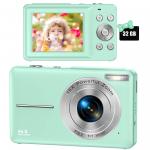
Children Camera, FHD 1080P Digital Camera for Kids Video Camera with 32GB SD Card 16X Digital Zoom, Compact Point and Shoot Camera Portable Small Camera for Teens Students Boys Girls Seniors(Black)
SKU: GW41.0089
A
If you want to directly transfer the photos/videos, there are following ways for you: Way 1: need a USB A to USB C adapter. If your phone is type-c port, you need to have a USB A to USB C adapter, use the equipped usb cable, type-C end of USB cable to connect the camera, another end of USB Cable (usb-A) to connect the USB A to USB C adapter, and then insert into your phone, you will see a U disk on your phone, and you can transfer the phones and videos. Way 2: Need a usb c sd card reader for Micro SD/SDXC/SDHC. We hope it is helpful to you. Thanks for your kind asking.
A
I guess your Macbook Air port is Type-C port, there are following ways for you: Way 1: need a USB A to USB C adapter. If your computer is type-c port, you need to have a USB A to USB C adapter, use the equipped usb cable, type-C end of USB cable to connect the camera, another end of USB Cable (usb-A) to connect the USB A to USB C adapter, and then insert into your computer, you will see a U disk icon on your computer, and then you can transfer the phones and videos on your computer. Way 2: Need a usb c sd card reader for Micro SD/SDXC/SDHC. We hope it is helpful to you. Thanks for your kind asking
A
Oh, no. It is not a macro lens. Thanks for your kind asking.
A
I already had a universal charger. The battery has a model number on them. It tells you what charger you can use.
A
You can use some small tools such as tweezers or toothpicks
A
You can connect the USB cable to your computer, you will see the camera's files and then play the videos. If it doesn't solve your issue, pls contact us and attach some pictures, so that I can know detailed issues, thanks. These are the steps to contact us: Login your amazon account > choose Your orders > find the order ID > click Contact seller.
A
The camera comes with a small SD card that goes in the camera and a regular-sized one that can fit into an SD card port. You can put the small card into the regular one and enter it into the SD port. Since I have a MacBook, I don't have an SD port in my laptop so I purchased a chord that has a small SD port as well as a regular-sized SD port, so I just plug it into my laptop and put the card into it.
A
Easy as pie! Just leave batteries in camera and plug in the camera!
A
You can connect USB cable to your computer and then you will see the camera's files, and then transfer pictures from your computer to your ipad.