How Do You Wire A Security Camera?
With security threats and concerns on the rise, setting up reliable surveillance systems has become a necessity for homes and businesses alike. Security cameras provide both peace of mind and a way to monitor your property and loved ones. Whether you are a homeowner trying to keep your family safe or a business owner safeguarding your assets, wiring a security camera is a crucial step in achieving that goal. Yet, many individuals find themselves facing challenges while installing and wiring their cameras.
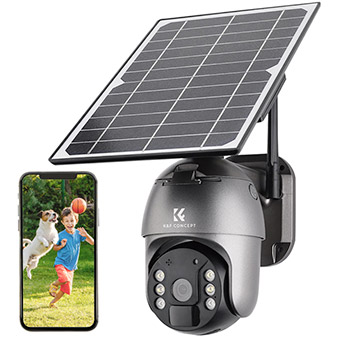
In this article, we will walk you through the process of wiring a security camera from start to finish. This guide covers the essentials, including preparation, tools and materials, different wiring types, tips for optimal setup, troubleshooting common challenges, and more.
Step 1: Understand Security Camera Wiring Basics
Before diving into the installation, it’s important to understand the two common types of security camera wiring setups: wired and wireless cameras. While wireless cameras rely on Wi-Fi or connectivity without physical cabling for the video feed, they still require power sources, which often involve wired connections. Wired cameras, on the other hand, utilize physical cables for both power and signal transmission, making them more stable and secure for long-term use.
Common Wiring Types:
1. Coaxial Cable (e.g., RG59, RG6)
Primarily used for analog CCTV systems, coaxial cables transmit video signals between the camera and the DVR (digital video recorder).
2. Ethernet Cable (e.g., Cat5e, Cat6)
Used for IP (Internet Protocol) cameras, Ethernet cables are versatile because they can carry power, video, and data signals simultaneously through Power-over-Ethernet (PoE) technology.
3. Power Supply Wiring
Cameras need power to operate, provided either through a dedicated power cable or integrated via PoE in Ethernet systems.
4. HDMI or Video Wiring
In cases where direct video output is needed, such as connecting cameras directly to a monitor, additional HDMI or video cables may be installed.
Step 2: Assess Camera Placement and Installation Requirements
The location of your security cameras determines the wiring layout and complexity. While wiring for indoor setups is relatively straightforward, outdoor installations may require weatherproofing and greater planning.
Key Considerations When Choosing Camera Placement:
Coverage: Prioritize high-traffic areas, entry points, blind spots, and vulnerabilities around the property.
Accessibility: Ensure wiring pathways are unobstructed.
Power Source Proximity: Cameras should be positioned close enough to power sources for easy connection.
Environmental Factors: Outdoor cameras need additional protective measures against weather, sunlight, and tampering.
Common Tools and Materials:
Ensure that you have the following tools and materials ready before starting the installation:
- Security cameras
- Power adapters
- DVR or NVR (Network Video Recorder)
- Coaxial cables or Ethernet cables
- Drill and screws
- Cable ties
- Cable molding or conduits for protection
- Optional: PoE switch (for IP cameras), weatherproof connectors
Step 3: Connect Power and Signal Wiring
Correct wiring ensures seamless operation of the camera. Below are step-by-step instructions for wiring different types of security cameras.
Wiring Analog Cameras:
1. Prepare Supplies: Start by organizing your coaxial cables (e.g., RG59). These cables are designed to carry video signals to the DVR and power separately. If your camera doesn’t support PoE, you’ll need a power supply cable as well.
2. Attach BNC Connectors: At the ends of your coaxial cables, attach BNC connectors (or use pre-terminated cables). Connect one end to your camera and the other to a channel input on your DVR.
3. Power Connection: With a separate power cable, connect the camera to a power adapter. Ensure that the power voltage matches the camera's requirement.
4. Test the Setup: Confirm signal transmission by checking the video feed via the DVR interface.
Wiring IP Cameras (Ethernet-Based):
1. Use PoE for Simplicity: IP cameras are often best connected using Cat5e or Cat6 Ethernet cables that support PoE. This eliminates the need for a separate power supply.
2. Install the Cable: Connect the Ethernet cable to your camera and the other end to the PoE-enabled port on the NVR or a PoE switch.
3. Configure IP Settings: Access the camera settings through the NVR or a computer to ensure the camera is properly configured within the network.
4. Secure the Cable: Use cable ties or conduits to minimize the risk of tampering or accidental damage.
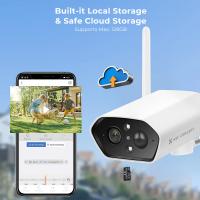
Wiring Wireless Cameras:
Even wireless cameras require power connections, unless they are battery-operated. Follow these basics:
1. Power Wiring: Connect your wireless camera to a nearby power outlet using its compatible power adapter.
2. Network Setup: Establish wireless connectivity through the camera’s mobile app or software dashboard. Ensure that your Wi-Fi router has sufficient coverage for seamless transmission.
Step 4: Secure and Protect Your Wiring
Professional wiring isn’t just about connecting cables; securing the wiring ensures long-term performance and reliability. Here’s how to protect your setup:
Tips for Wiring Safety:
Use Weatherproof Materials: Outdoor cameras’ cables should be sealed in weatherproof conduits to prevent water damage.
Avoid Sharp Bends: Never sharply bend cables, as this can damage their internal structure and compromise signal quality.
Cable Molding: Use cable molding to keep wiring organized and concealed, especially for interior installations.
Stable Mounting: Ensure that cameras and wires are firmly attached to walls, ceilings, or poles to avoid falling or damage over time.
Step 5: Test and Troubleshoot
Once everything is wired, testing ensures that your system works correctly. Here are some key testing steps:
1. Video Feed: Confirm that you can see live footage without interruptions on your monitor, DVR, or mobile app.
2. Power Stability: Check for continuous power and ensure the camera operates seamlessly.
3. Signal Integrity: Verify that the video and metadata (if applicable) are transmitted without errors or lag.
Common Wiring Issues and Solutions:
No Power to Camera: Double-check the power adapter connection or inspect for damaged wires.
Weak Video Signal: Ensure cables haven’t been stretched or damaged. For IP cameras, verify network settings and bandwidth.
Flickering Video: Check for loose cable connections or interference from nearby power lines.
Step 6: Future-Proofing Your Security Camera Wiring
To ensure long-term usability and effectiveness, follow these practices:
Upgrade to PoE: If you’re using analog or older camera setups, consider upgrading to Ethernet-based PoE wiring for more streamlined connectivity and better performance.
Regular Maintenance: Periodically inspect cables for damage, wear, or disconnection.
Invest in Quality Materials: Use high-quality cables, connectors, and protective gear to minimize maintenance needs and improve reliability.
Final Thoughts
Wiring a security camera may seem daunting at first, but with proper preparation, tools, and techniques, you can confidently install a robust surveillance system. Whether you are working on analog or IP cameras, mastering the wiring process ensures high-quality video feeds, uninterrupted operation, and enhanced security outcomes. By taking steps to plan your camera placement, protect the wiring, and conduct regular maintenance, you can enjoy peace of mind knowing your property is safeguarded.
Security cameras are more than a technology investment; they are a fundamental part of safety in modern times. Following this guide, you’re now equipped with the knowledge to wire your security cameras like a pro and ensure your surveillance system enhances your personal or business security.