kfconcept

K&F Concept Canada
K&F Concept Canada

Enjoy Your Selected Digital Life

Recently Viewed
  • Recently Viewed
  • Recently Viewed list is empty.

Compare (0) 0
  • Compare
  • You have not chosen any products to compare.

  • Compare
Currency: CAD
  • Currency

Log Into Your Account

Account

Order History

Wish List

Login

Forgotten Password?

Or connect with

Register Account

Already have an Account?Log In

  • Shopping Cart
  • Your shopping cart is empty!

  • Register/Login to purchase, earn points
  • Favorite
  • Your wish list is empty.

  • Register/Login to like, earn points
  • Tripods
    • Carbon Fiber Tripods
    • Aluminum Tripods
    • Video Tripods
    • Monopods
    • Phone Tripods
    • Tripod Accessories
    • Mini Tripod
    • Action Camera Mounts
    • Studio Parts
      • Photography Fill Light
      • Soft Box
      • Reflectors
      • Ring Light
      • Camera Flash
      • Tripod Light Stands
    • Gimbal Stabilizers
  • Lens Filters
    • UV Filters
      • Nano-Xcel Series
        • MCUV - Nano-Xcel
        • Ultra-low Reflectivity MCUV Filters
        • MCUV Super Hard
        • Explosion-proof MCUV - Nano-Xcel
        • MCUV+Lens Cap+Cleaning Cloth
        • Super Hard&Ultra Low Reflection MCUV Filters - Nano-Xcel
        • Magnetic MCUV - Nano-Xcel
      • Nano-Dazzle Series
        • MCUV Filters - D Series
        • MCUV+Lens Cap+Cleaning Cloth
      • Nano-Klear Series
        • MCUV Filters
        • Ultra Thin Frame MCUV Filter
        • MCUV+Lens Cap
        • MCUV+Lens Cap+Cleaning Cloth
      • Nano-Xcel Pro Series
        • MCUV
    • Polarizers
      • Nano-Xcel Series
        • True Color Ultra-low Reflectivity CPL - Nano-Xcel
      • Nano-Dazzle Series
        • CPL+Lens Cap+Cleaning Cloth - Nano-Dazzle
      • CPL - Nano-X Series
      • Nano-Klear Series
      • Nano-Xcel Pro Series
        • CPL - Nano-X Pro Series
      • CPL - Nano-K Series
      • CPL - Nano-D Series
      • CPL True Color - Nano-X Series
      • CPL+Lens Cap+Cleaning Cloth - Nano-K Series
      • Ultra-low Reflection CPL - Nano-X
      • Ultra-Thin CPL- Nano-K Series
      • CPL - Magnetic Series
        • Magnetic CPL + Apater Ring + Cap
    • Square Filter System
      • Basic System
        • Square ND Filter
          • ND4 Filters - Nano-Xcel Series
          • ND16 Filters - Nano-X
          • ND1000 Filters - Nano-X
          • ND2000 Filters - Nano-X
          • ND32000 Filters - Nano-X
          • Full Color ND8 Filters - Nano-X
          • Full Color ND64 Filters - Nano-X
        • Square GND Filter
        • Square Light Pollution Cut Filter
          • Light Pollution Cut Filter - Nano-X
        • Square Black Mist Filter
          • Black Mist 1 - Nano-X
          • Black Mist 1/2 - Nano-X
          • Black Mist 1/4 - Nano-Xcel Series
          • Black Mist 1/8 - Nano-X
        • Square Brackets & Accessories
          • Adapter Ring - Nano-X
        • 100mm Square Filter Kits
          • Square Filter - Nano-X
          • ND1000+Holder - Nano-X
          • ND1000+Soft GND8+Holder-Nano-X
          • Soft GND8+Holder - Nano-X
      • Professional System
        • Square PL Filter
        • Square ND Filter
          • Full Color ND8 Filters - Nano-X Pro
          • Full Color ND64 Filters - Nano-X Pro
          • Full Color ND1000 - Nano-X Pro
        • Square GND Filter
        • Black Mist 1/4 & CPL - Nano-X Pro
        • Light Pollution Cut Filter
          • Light Pollution Cut - Nano-X Pro
        • Square Brackets & Accessories
          • 100x100mm Square Filter Protect Frame - Nano-X Pro
          • 100x150mm Square Filter Protect Frame - Nano-X Pro
          • Adapter Ring - Nano-X Pro
        • Square Filter Kits
          • 100mm ND1000+Holder Kit - Nano-X Pro Series
          • 100mm ND1000+Soft GND8+Holder Kit - Nano-X Pro Series
          • 100mm ND8+ND64+ND1000+Holder Kit - Nano-X Pro Series
          • 100mm Holder Kit - Nano-X Pro Series
    • Neutral Density Filters
      • Neutral Density (Solid) Filters
        • Solid ND - Magnetic Series
        • ND8 (3 stops) - Nano-Xcel Series
        • ND64 (6 stops) - Nano-Xcel Series
        • ND1000 (10 stops) - Nano-Xcel Series
        • ND100000 (16.6 stops) - Nano-Xcel Series
        • ND1000000 (20 stops) - Nano-Xcel Series
        • ND100000 (16.6 stops) - Nano-Klear Series
        • ND1000000 (20 stops) - Nano-Klear Series
      • Unlimited Variable ND Filters
        • ND2-ND400 Filter w/ Cap - Nano-K
        • ND2-ND400 Filter Set - Nano-K
      • Variable Neutral Density
        • Nano-Xcel Series
          • ND2-ND32 - Nano-X Series
          • ND2-ND32 True Color - Nano-X Series
          • ND2-ND400 - Nano-X Series
          • ND8-ND128 - Nano-X Series
          • ND32-ND512 - Nano-Xcel
          • ND3-ND1000 - Nano-X Series
          • ND2-32 True Color Ultra-Low Reflection - Nano-Xcel
        • Nano-Dazzle Series
          • ND2-ND32 - Nano-Dazzle
          • ND2-ND400 - Nano-Dazzle
          • ND3-ND1000 - Nano-Dazzle
          • ND8-ND2000 - Nano-Dazzle
        • Nano-Klear Series
          • ND2-ND32 - Nano-Klear
          • ND2-ND400 - Nano-Klear
          • ND2-ND2000 - Nano-Klear
        • Nano-Xcel Pro Series
          • ND2-ND32 - Nano-Xcel Pro
        • Nano-B Series
          • ND2-ND400 - Nano-B
        • ND2-32&ND32-512 - Nano-X Series
      • Graduated Neutral Density
        • 100mm GND Filter
          • Soft GND8 Filters - Nano-Xcel Series
          • Hard GND8 Filters - Nano-Xcel Series
          • Reverse GND8 Filters - Nano-Xcel Series
          • Soft GND16 Filters - Nano-Xcel Series
          • Reverse GND16 Filters - Nano-Xcel Series
          • Soft GND8 Filters - Nano-Xcel Pro Series
          • Hard GND8 Filters - Nano-Xcel Pro Series
          • Reverse GND8 Filters - Nano-Xcel Pro Series
          • Soft GND16 Filters - Nano-Xcel Pro Series
          • Reverse GND16 Filters - Nano-Xcel Pro Series
        • Circular GND Filter
          • GND8 - Nano-Xcel Series
          • GND16 - Nano-Xcel Series
      • 2 in 1 Filters
        • ND4-ND64 & CPL - Nano-X Series
        • ND2-ND32 & CPL - Nano-X Pro
        • ND2-ND32 & CPL - Nano-X Series
        • ND2-32&CPL Filters - Nano K Series
        • ND2-ND32 & CPL - Nano-D Series
        • ND2-ND32&CPL True Color - Nano-X
    • Black Mist & Soft Focus Filters
      • Black Mist
        • Black Mist 1
          • Black Mist 1 - Nano-X Series
          • Black Mist 1 - Nano-K Series
        • Black Mist 1/2
          • Black Mist 1/2 - Nano-X Series
          • Black Mist 1/2 - Nano-K Series
        • Black Mist 1/4
          • Black Mist 1/4 - Nano-X Series
          • Black Mist 1/4 - Nano-D Series
          • Black Mist 1/4 + Cloth - Nano-K Series
          • Black Mist 1/4 - Nano-Xcel Pro Series
        • Black Mist 1/8
          • Black Mist 1/8 - Nano-X Series
          • Black Mist 1/8 + Cloth - Nano-K
          • Black Mist 1/8 - Nano-D
          • Black Mist 1/8 - Nano-Xcel Pro Series
        • Black Mist Kit
          • Black Mist 1/4 + 1/8
          • Black Mist 1/4 + 1/8 - Nano Klear Series
        • Black-Mist & VND
          • Black Mist 1/4 & ND2-32 Filters - Nano-Klear Series
          • Black Mist 1/4 & ND2-400 Filters - Nano-Xcel Series
          • Black Mist 1/4 & ND8-128 Filter
          • Black Mist 1/4 & ND2-32 Filter
          • Black Mist 1/8 & ND2-32 Filters - Nano-Klear Series
      • White Mist
        • White Mist 1/4 - Nano-Xcel Series
        • White Mist 1/4 - Nano-Klear Series
      • Vintage Soft
      • Combination Soft & Mist
    • Magnetic Lens Filters
      • MCUV Filters
        • Magnetic MCUV + Lens Cap
        • Magnetic MCUV - Nano-K Series
      • Polarizers
        • Magnetic CPL + Adapter Ring
        • Magnetic CPL+Adapter Ring - Nano-Klear Series
      • Black-Mist
        • Black Mist 1/8 - Nano-X Series
        • Black Mist 1/4 - Nano-X Series
        • Black Mist 1 - Nano-X Series
      • Unlimited Variable ND Filter
        • ND2-ND32 - Magnetic Series
        • ND8-ND128 - Magnetic Series
      • Neutral Density (Solid) Filter
        • Magnetic ND8 - Nano-X Serie
        • Magnetic ND64 - Nano-X Serie
        • Magnetic ND1000 - Nano-X Serie
      • Filter Kits
        • MCUV+CPL+ND1000 - Nano X Series
        • CPL+ND8+ND64+Adapter Ring+Lens Cap - Nano X Series
        • GND8+ND8+ND64+ND1000 - Nano X Series
        • CPL+VND2-32+Black Mist 1/4+Magnetic Ring+Lens Cap - Nano-Xcel Series
      • Accessories
        • Magnetic Adapter Ring
        • Magnetic Filter Ring
        • Magnetic Cap
    • Action Camera Filters
      • Action Camera Accessories
      • DJI Osmo Action 4 / Action 5 Pro
      • DJI Osmo Action 5 Pro
      • DJI Osmo Pocket 3
      • GOPRO Hero 9/10/11/12/13
      • Insta360 GO3
      • Insta360 GO3S
      • DJI Action 3
    • Filter Kit
      • Black Diffusion 1/4 + 1/8
      • Screw-In Filters
        • MCUV+CPL Filter - Nano K Series
        • MCUV+CPL+Lens Cap - Nano K Series
        • MCUV+CPL+Lens Cap - Nano-Xcel Series
        • MCUV+CPL+ND1000+Lens Cap - Nano-Dazzle Series
        • MCUV+CPL+ND4
        • ND1000+CPL
        • ND4+ND8+ND64+ND1000
        • MCUV+CPL
      • Magnetic Filters
      • Square Filters
    • Effects Filters
      • Shimmer Diffusion Filters
        • Shimmer Diffusion 1 - Nano-Xcel Series
        • Shimmer Diffusion 1 - Nano-Klear Series
      • Prism Filters
        • Central Prism Filters
          • Central Pentagonal Filters - Nano-Basic Series
          • Central Hexagonal Filters - Nano-Basic Series
        • Ordinary Prism Filters
          • Triangular Filtres - Nano-Basic Series
      • Streak Filters
        • Blue Streak Filter
        • Gold Streak Filters - Nano-Xcel Series
        • Colorful Streak Filters - Nano-B Series
        • Blue Streak Filters - Nano-Klear Series
      • Kaleidoscope Filters
        • Kaleidoscope Filters - Nano-Basic Series
        • Handheld Kaleidoscope Filters - Nano-Basic Series
      • Motion Blur Filters
        • Directional Motion Blur - Nano-Basic Series
        • Bidirectional Motion Blur - Nano-Basic Series
      • Centerfield Split Diopter Filters - Nano-Klear Series
      • Star Filter
        • Star Filters 4-8 Points - Nano-K Series
        • Star Filter Kits 4+6+8 Points - Nano-K Series
    • Filter Accessories
      • Lens Hoods
      • Polarized Film
      • Rings Kits
        • Step Up Rings
        • Step Down Rings
      • Filter Holders & Frames
      • Filter Holder Adapter Rings
        • Filter Adapter Rings
      • Filter Pouches
        • 150mm Pouch for Nano-X Pro System
        • 100mm Pouch for Nano-X Pro System
        • 110x106mm Filter Pouch
        • 96x96mm Filter Pouch
        • Pocket Filter Pouch
      • Lens Caps
        • Caps for Magnetic Filters
        • Caps for Variable ND Filters
        • Anti-lost Lens Cap
          • 4 in 1
          • 5 in 1
          • 9 in 1
    • Light Pollution Filters
      • Light Pollution Cut Filter - Circular
      • Light Pollution Cut Filter - Square
    • Phone Lens Filters
    • Drone Filters
      • DJI Air 2S
      • DJI Air 3S
      • DJI Avata2
      • DJI Mavic 3 Classic
      • DJI Mavic 3 Pro
      • DJI Mini
      • DJI Mini 4 Pro
      • DJI Mini 3 PRO
      • DJI Flip
      • DJI NEO
      • DJI Mavic 4 Pro
      • DJI Mini 5 Pro
      • DJI Air 3 Filters
    • Matte Box & Filter Systems
      • Neutral Density (Solid) Filters
        • ND4 - Nano-X Series
        • ND8 - Nano-X Series
        • ND16 - Nano-X Series
        • ND32 - Nano-X Series
        • ND64 - Nano-X Series
        • ND8+ND64 - Nano-X Series
      • UV Filters
      • Black Mist Filters
        • Black Mist 1/4 - Nano-X
        • Black Mist 1/8 - Nano-X Series
      • Blue Streak Filters
      • Kits
        • Matte Box - Nano-Xcel
        • Matte Box Pro - Nano-Xcel Series
        • Matte Box+ND8 Square Filter - Nano-Xcel
        • Matte Box+ND4+ND32 Square Filter - Nano-Xcel
        • Matte Box+Black Mist 1/4 Square Filter - Nano-Xcel
    • Brand-specific Filters
      • Fujifilm X100
      • Ricoh GR
  • Lens Adapters
    • Sony A Mount Body
    • Fujifilm X Mount Body
    • Fujifilm C (GFX) Mount Body
    • C-Mount Body
    • Leica M Mount Body
    • Micro Four Thirds (M43) Mount Body
    • Pentax K Mount Body
    • Pentax Q Mount Body
    • Samsung NX Mount Body
    • Nikon F Mount Body
    • Nikon 1 Mount Body
    • Nikon Z Mount Body
    • Canon EOS EF/EF-S Mount Body
    • Canon EOS M Mount Body
    • Canon RF Mount Body
    • Sony E Mount Body
    • L-Mount Alliance (Leica)
  • Camera Bags
    • Camera Backpacks
    • Camera Straps
    • Camera Cases
    • Camera Shoulder Bags
    • Backpack Accessories
  • Surveillance Camera
    • Battery Camera
    • WiFi Camera
    • Baby Monitor
    • Feeder Camera
    • Floodlight camera
    • Monitoring Detector
  • Camera
    • Digital Camera & Camcorders
    • Trail Camera
      • Wifi Trail Cameras
      • Non-Cellular Trail Cameras
      • Cellular Trail Cameras
      • Accessories
    • Camera Battery
      • Sony
      • Canon
      • Nikon
      • FUJIFILM
      • Gopro
      • Lumix
      • Osmo Action
      • V Mount Battery
      • Memory Card Case
    • Camera Lenses
    • Webcam
    • Fishing Camera
    • On-Dash Camera
    • time lapse camera
    • Memory Cards
    • Camera Accessories
      • Camera Body Caps & Lens Rear Caps
      • Camera Screen Protectors
        • Canon
        • Sony
        • Fujifilm
        • Nikon
        • Olympus
        • Ricoh
        • GoPro
        • DJI Osmo Pocket 3
      • Camera Hot Shoe Covers
      • Camera Viewfinder Eyecups
        • Nikon
        • Sony
        • Canon
      • Adjustment Iris
      • Ricoh GR Lens Caps
  • Endoscope
    • Digital Otoscope
    • Household Endoscope
    • Professional Endoscope
    • Portable Endoscope
  • Optics
    • Binoculars
    • Microscope
    • Monocular
    • Spotting Scope
    • Telescope
    • Night Vision Goggles
    • Rangefinder
  • More
    • Cleaning Kits
    • Digital Voice Recorders
    • Metal Detectors
    • Microphone
    • Motorcycle Bluetooth Headset
    • Remote Sensors
    • Drone Accessories
      • DJI Air 2S Accessories
      • DJI Air 3 Accessories
      • DJI Avata Accessories
      • DJI Drone Universal Accessories
      • DJI Mavic Mini 2/Mini 2 SE/Mini Accessories
      • DJI Mavic Mini 3 Accessories
      • DJI Mini 3 Pro Accessories
    • Language Translator Device
    • Smart Glasses
    • Solar Panels
    • Handheld Game Console
    • Lights
      • Video Fill Light
      • Live Ring Light
      • Outdoor Lighting
    • Camera Microphones
    • Headphones
    • Weather Station & Household Sensors
    • Smart Watch
    • Smart lock
    • Chicken Coop Door
    • Studio
  • Deals
    • Specials
    • Coupon
  • Home
  • Blog
  • How To Setup Wifi Smart Camera Video?

How To Setup Wifi Smart Camera Video?

K&f concept 2025-09-15 03:53:17 0 Comments

Setting up a Wi-Fi smart camera for video monitoring can seem intimidating at first, but with the right steps and instructions, it can be a seamless and straightforward process. Whether you’re using it for home security, monitoring pets, or simply keeping an eye on your property, a Wi-Fi smart camera offers unmatched convenience and accessibility. In this article, we’ll break down the entire setup process into clear, actionable steps, answer common user concerns, and provide tips to troubleshoot common problems.
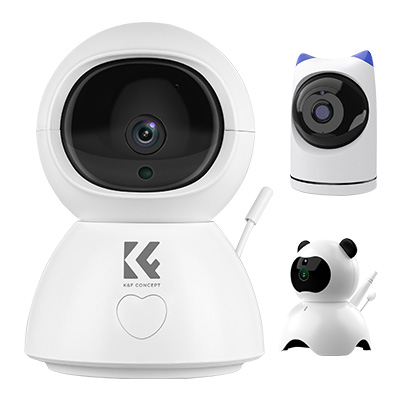

Step 1: Preparation Before Setup

Before diving into the technical process, it's essential to prepare both the space and devices you'll be working with.

1. Check the Wi-Fi Network

- Ensure you have a reliable Wi-Fi network with a strong connection in the area where you want to place the camera.

- Most Wi-Fi cameras operate on 2.4 GHz networks. Some newer models support dual-band (2.4 GHz and 5 GHz). Make sure your router supports the frequency compatible with your device.

2. Download the Associated App

- Almost all smart cameras require configuration through their dedicated mobile app. Search for the app in your device's app store (Google Play Store or Apple App Store). For instance, for brands like Ring, Wyze, or Arlo, download their proprietary apps.

3. Create an Account with the Camera’s Manufacturer

- Open the app and create an account. You'll likely need to provide an email address or phone number and set up a password. Once completed, verify your account through an email or text confirmation.

4. Power on the Camera

- Plug in the camera to a power outlet using the supplied adapter and cable. Wait for it to turn on. Most cameras will display an indicator light or sound to let you know they are powered and ready to pair.

Step 2: Placement of the Camera

Before connecting your smart camera to your Wi-Fi network, it's helpful to decide where you want your camera to go.

1. Choose the Right Location

- Ensure the area provides a clear view of the space you wish to monitor without obstructions like walls, furniture, or plants.

- If the camera is for outdoor monitoring, make sure it’s weather-resistant and mounted to offer optimal coverage, potentially with a bird’s-eye view.

2. Consider Power Outlet Accessibility

- Place the camera close enough to a power source if it's not battery-operated. Avoid relying on extension cords if possible to ensure safety.

3. Check Wi-Fi Signal Strength

- Use your smartphone to test Wi-Fi signal strength in the chosen location. Weak signals may affect the camera’s performance. If the signal is insufficient, consider relocating the router or using a Wi-Fi extender.

Step 3: Connecting Your Camera to Wi-Fi

At this point, your camera is powered on, and you’ve downloaded the app. Now it’s time to connect the device to your Internet.

1. Initiate the Pairing Process

- Open the app and follow its setup wizard to add a new device. Most cameras will require you to select the type of device you’re adding before proceeding.

- In some cases, you'll be asked to scan a QR code on the camera or in the manual.

2. Select Your Wi-Fi Network

- The app will prompt you to choose your home Wi-Fi network and enter the password. Make sure to select the correct network (and not a guest network unless explicitly needed).

3. Wait for Connection Confirmation

- The camera will attempt to connect to the selected Wi-Fi network. During this phase, a pairing indicator on the camera (usually a light or a tone) will confirm if the connection has been successfully established.

4. Link the Camera to the App

- After pairing is complete, the app will finalize the connection. You may need to customize the camera name (e.g., "Front Door" or "Living Room") at this stage.

- Test the live feed to ensure everything is working correctly.

Step 4: Configuring Camera Settings

Once the camera is running, configuring the right settings ensures you get optimal performance tailored to your needs.

1. Adjust Video Quality

- Most Wi-Fi cameras allow you to choose between resolutions such as 720p, 1080p, or higher. For areas with limited bandwidth or weak signal, lowering the video quality can prevent buffering.

2. Set Up Motion Detection

- Almost all smart cameras offer motion detection alerts. Use the app to set up detection zones to prevent unnecessary notifications from areas like roads or trees. Fine-tuning this reduces the chance of false alarms.

3. Customize Alerts

- Decide how you want to be notified, whether through app notifications, email alerts, or both. You can usually choose to disable alerts during certain hours for added convenience.

4. Enable Two-Way Audio

- If your camera has a microphone and speaker, enable the two-way communication feature to talk through your camera. You may need to test the volume levels and clarity of audio as part of this step.

5. Explore Cloud Storage and Subscriptions

- Many Wi-Fi cameras offer cloud-based storage for recorded footage. Depending on the brand, you might need a subscription to access these services. Without it, you may need to use local recording options like an SD card (if supported).

Step 5: Mounting the Camera

If you're happy with your test results and settings, it's time to finalize the installation.

1. Attach the Camera

- Most cameras come with mounting kits that include screws and brackets. Secure the camera carefully, especially if it's placed at a height, to avoid accidental falls.

- If it's a magnetic mount, ensure the surface is compatible for stable placement.

2. Test the View and Connectivity

- Double-check the camera’s field of view in the app. Adjust angles to avoid blind spots while ensuring the crucial areas are covered.

- Retest the Wi-Fi signal strength in this placement. Consider reconfiguring your setup if there are connectivity interruptions.

Common Troubleshooting Tips

Even with the best preparation, you may encounter issues during or after setup. Here are some quick remedies:

1. The Camera Won’t Pair with Wi-Fi

- Double-check the Wi-Fi password and ensure the network operates on a compatible frequency (e.g., 2.4 GHz).

- Restart the camera or perform a factory reset if needed. Refer to the manual for reset instructions.

2. Live Feed is Lagging or Not Loading

- Check your Internet speed to ensure it meets your camera's requirements. Lower the video streaming quality if needed.

- Reduce the number of connected devices on your network for improved performance.

3. Motion Detection Is Too Sensitive

- Revisit the app to adjust detection zones or sensitivity levels. Try testing different configurations to narrow down unnecessary alerts.

4. Camera Disconnects Frequently

- Ensure the device is within range of the router. If not, invest in a Wi-Fi extender to enhance signal coverage.

Setting up a Wi-Fi smart camera for video is a simple process when approached methodically. By preparing adequately, following proper installation steps, and troubleshooting proactively, you can ensure that your camera works seamlessly within your desired environment. Remember, the ultimate goal is to match the camera's settings to your specific needs—whether it’s keeping an eye on your front door, monitoring kids, or enhancing your home’s overall security.

In addition, take time to familiarize yourself with advanced features offered by your camera model. Features like time-lapse recordings, smart home integrations (e.g., Alexa or Google Assistant), or AI-based motion detection can unlock even greater functionality and convenience.

By adhering to these guidelines, your Wi-Fi smart camera can serve as a reliable tool for monitoring, protecting, and connecting you to your space anytime, anywhere.

Leave your comment
Cancel reply
Note: HTML is not translated!
Related Products
Smart Camera Glasses, HD 1080P, EIS Stabilization, WiFi Connect, Translation, 4H Playtime, Kentfaith
C$164.03 C$131.22
Smart Glasses with Camera, 8MP Sony Camera for 1080P POVs, 13MP Photos, Dual Lenses, EIS Stabilization, WiFi Transfer, 32GB Storage, 10H Playtime, Kentfaith
C$190.20 C$152.16
Mini Body Camera Video Audio Recorder with WiFi Wearable Bodycam 180° Lens
13
C$100.99 C$80.79
5K Digital Video Camera Camcorder WIFI IR Night Vision for Vlogging Youtube
11
C$323.59 C$258.87
Dental Intraoral Camera WiFi 2MP Photo & Video 8 LEDs for Home Kentfaith
11
C$143.10 C$114.48
WiFi 3 Lens Solar Security Camera Wireless Outdoor, 6MP Full HD Video, 360° View Pan/Tilt Home Security Camera with Color Night Vision, Easy to Install, PIR Alarm, Kentfaith
C$218.08 C$174.46
WiFi Telescope Camera with 1.5in Screen 1080P Video 1000mAh Battery for Monoculars Binoculars Microscopes Telescopes
13
C$140.69 C$112.55
4K Video Camera, 64MP Photos, WiFi Connect, 28X Zoom, Wireless Mic, Full Color NV, Kentfaith
C$293.84 C$235.07
Guess you like products
82mm Black Mist 1/4 Filter with Brass Frame, Ultra Low Reflection, Mist Soft Glow Diffuser Lens Filters with 36 Multi-Layer Coatings - Nano-X Pro Series
C$188.99 C$125.99
62mm Magnetic 4-in-1 Lens Filter Kit (MCUV+CPL+ND1000+Adapter Ring+Filter Pouch)
125
C$299.99 C$109.99
52mm CPL Filter ultra-thin Trapezoidal Frame  Blue-Coated Film with a piece of vacuum cleaning cloth Nano-Klear Series
52mm CPL Filter ultra-thin Trapezoidal Frame Blue-Coated Film with a piece of vacuum cleaning cloth Nano-Klear Series
C$29.99 C$17.99
(Flash Deal One order per customer) K&F Concept TM 2624L Black Portable Conpact Tripod, 69.7"/1.77m Phone Tripod DSLR Tripod 8.8lbs Load with Phone/Pad Mount
C$79.99 C$0.10
82mm MCUV+CPL+ND4 Lens Filter Kit with Lens Cleaning Cloth and Filter Bag Nano-Klear
18
C$71.99 C$58.99
Mini 4 Pro UV Filter, MCUV Protection Filter, HD Optical Glass Multi-Coated Filter Compatible with DJI Mini 4 Pro
C$64.99 C$25.99
40.5mm CPL Filter True Color Circular Polarizers Filter with 28 Multi-Layer Coatings for Camera Lens Nano-Xcel Series
C$99.99 C$52.99
K&F Concept Camera Sling Bag Small Crossbody Camera Case DSLR/SLR/Cute Compact Shoulder Photography Bags for Photographers - Sling Bag5L Urban Wander 05 (Beige)
C$72.58 C$36.29
K&F Concept Electric Compressed Air Duster - 300000RPM Vacuum Cleaner, 3 Gear Adjustable, Super Wind Power, Rechargeable Brushless Motor for Deep Computer Clean, Keyboard, Car, Home, Outdoor
C$107.50 C$89.59
77mm MCUV Lens Filter Nano-Xcel Series - 28 Multi-Layer Coatings HD/Waterproof/Scratch Resistant for Camera Lens
67
C$89.99 C$52.99
Related Articles
How To Transfer Photos From Wifi Camera?
Can Cctv Camera Work Without Wifi?
Can Ip Camera Work On Wifi?
How To Charge A Flip Video Camera?
How To Take Video On Digital Camera?
How To Setup Webcam?
How Does A Wifi Trail Camera Work?
How To Install A Waterproof Ptz Wifi Camera?
How To Change Wifi On Ring Security Camera?
How To Put Memory Card In Camera?
Guess you like articles
How To Replace Projector Bulb?
How To Record Audio On Facetime?
How To Find Magnifying Power Of Telescope?
How Much Does A Metal Detector Cost?
How To Install Wireless Security Cameras?
How To View Webcam On Windows 7?
How To Adjust Binoculars?
Can I Move Apps To An Sd Card?
How Much Does It Cost Install Solar Panels?
How Do I Record Audio On My Phone?
Related categories
Battery Powered WiFi Security Camera Outdoor variable ND2 to ND400 filter 46mm camera filters DSLR Camera Flash DSLR Camera Backpacks DSLR Camera Cases Camera Cleaning Kits camera color filters camera shoulder bags security light cameras
Related searches
Solar Eclipse Camera Setup Wildlife Video Camera Wildlife Camera Wifi Wifi Wildlife Camera Solar Cctv Camera Wifi Trail Camera That Connects To Home Wifi Tripods For Video Cameras K&f Concept Video Tripod Variable Nd Filter For Video Home Weather Station With Wifi
Blog Category
  • News & Reviews
Search Article
Latest from the Blog
How To Change Bike Camera Settings?
Exploring the new Sony A7M5 camera: What are the upgrades and is it worth buying?
What Is The Best Monopod?
What Is The Best Floodlight Security Camera?
What Is The Best Wireless Lav Mic?
What Is The Best Camera For Cycling?
What Kind Of Telescope Is Best For Beginners?
What Is The Best Wireless Door Camera?
What Is The Best Thermal Imaging Monocular?
Which Kids Camera Is The Best?
What Is The Best Brand Of Tripods?
What Is The Best Battery-powered Camera?
Which Tripod Is Best For Photography?
Kentfaith Black Friday 2025 Deals
Which Overhead Headphones Are Best?
What Is The Best Way To Clean Your Lenses?
What Portable Solar Panel Is Best?
What Is The Best Video Surveillance?
What Are The Best Wireless Earbuds For Iphone?
What Is The Best Camera Bag?
Powered By K&F Concept © 2025