How Do Wireless Microphones Work?
Wireless microphones have become an essential tool in various fields, from live performances and broadcasting to corporate presentations and public speaking. Understanding how these devices work can help users make informed decisions about their use and maintenance. This article delves into the mechanics of wireless microphones, their components, frequency management, and best practices for optimal performance.
The Basics of Wireless Microphones

At their core, wireless microphones function by converting sound into an electrical signal, transmitting that signal wirelessly, and then converting it back into sound. This process involves several key components:
1. Microphone Element: This is the part of the microphone that captures sound. It can be a dynamic or condenser element, each with its own characteristics and suitable applications.
2. Transmitter: The transmitter is responsible for converting the electrical signal from the microphone element into a radio frequency (RF) signal. This RF signal is then sent wirelessly to the receiver.
3. Receiver: The receiver captures the RF signal and converts it back into an electrical signal, which can then be amplified and sent to a sound system or recording device.
Types of Wireless Microphones
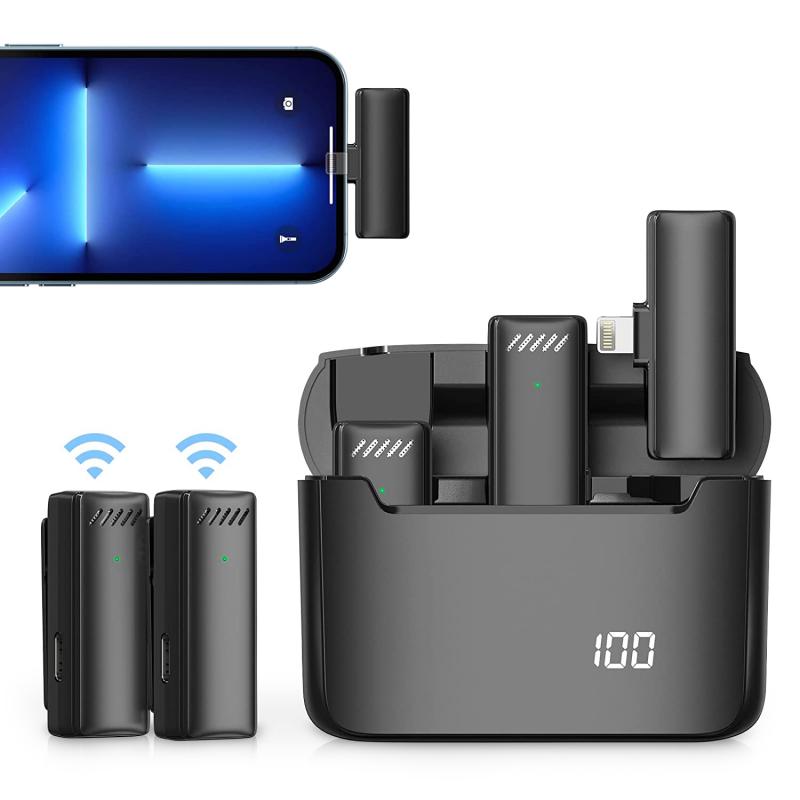
Wireless microphones come in various forms, each designed for specific applications:
- Handheld Microphones: These are commonly used in live performances and public speaking. They are easy to handle and often come with built-in transmitters.
- Lavalier Microphones: Also known as lapel mics, these are small and can be clipped onto clothing. They are ideal for presentations and interviews.
- Headset Microphones: These are worn on the head and are popular in fitness instruction, theater, and broadcasting.
- Instrument Microphones: Designed to be attached to musical instruments, these microphones are used in live music performances and recordings.
Frequency Management
One of the critical aspects of using wireless microphones is managing the frequencies they operate on. Wireless microphones typically use VHF (Very High Frequency) or UHF (Ultra High Frequency) bands. Each band has its advantages and challenges:
- VHF: Operating between 30 MHz and 300 MHz, VHF microphones are less expensive but more susceptible to interference and have a shorter range.
- UHF: Operating between 300 MHz and 3 GHz, UHF microphones offer better range and less interference but are more expensive.
In recent years, the availability of frequencies for wireless microphones has become more restricted due to the increasing demand for wireless communication devices. Users must be aware of local regulations and ensure their equipment operates within legal frequency ranges.
Signal Transmission and Interference

Wireless microphones transmit signals using either analog or digital technology:
- Analog Transmission: This method modulates the audio signal onto a carrier frequency. While it is reliable and has low latency, it is more prone to interference and signal degradation.
- Digital Transmission: This method converts the audio signal into a digital format before transmission. It offers better sound quality, less interference, and encryption options, but can have higher latency.
Interference is a significant concern for wireless microphone users. Sources of interference include other wireless devices, electronic equipment, and physical obstacles. To minimize interference, users should:
- Select Appropriate Frequencies: Use frequency coordination tools to find the best available frequencies.
- Maintain Line of Sight: Ensure there are no physical barriers between the transmitter and receiver.
- Use Diversity Receivers: These receivers have multiple antennas and can switch to the best signal, reducing dropouts.
Power Management
Wireless microphones rely on batteries for power. Proper power management is crucial for uninterrupted performance:
- Battery Type: Use high-quality batteries, preferably rechargeable ones, to ensure consistent power supply.
- Battery Life: Monitor battery levels and replace or recharge batteries before they run out.
- Power Saving Features: Some wireless microphones come with power-saving features like auto-off or standby modes.
Best Practices for Optimal Performance
To get the best performance from a wireless microphone, consider the following best practices:
1. Proper Placement: Position the microphone correctly to capture the best sound. For handheld mics, hold them close to the mouth. For lavalier mics, place them on the chest area.
2. Gain Adjustment: Set the gain levels appropriately to avoid distortion or low volume.
3. Regular Maintenance: Clean the microphone and check for any damage regularly. Replace worn-out components as needed.
4. Testing: Always test the microphone and the entire wireless system before use to ensure everything is working correctly.
Troubleshooting Common Issues
Despite best efforts, issues can still arise with wireless microphones. Here are some common problems and their solutions:
- Dropouts: If the signal drops out, check for interference, ensure the transmitter and receiver are within range, and maintain a clear line of sight.
- Interference: If there is interference, try changing the frequency, moving away from other electronic devices, or using a different channel.
- Distortion: If the sound is distorted, adjust the gain levels and check for any physical damage to the microphone element.
- Low Battery: If the battery runs out quickly, use high-quality batteries and ensure they are fully charged before use.
Wireless microphones are invaluable tools that offer freedom of movement and convenience. By understanding how they work, managing frequencies, minimizing interference, and following best practices, users can ensure optimal performance and longevity of their wireless microphone systems. Whether for live performances, presentations, or recordings, a well-maintained wireless microphone can significantly enhance the quality and professionalism of any audio setup.