How To Check A Camera Battery?
Cameras are indispensable tools for professionals, hobbyists, and casual users alike. Among their many components, the camera battery plays a crucial role in ensuring uninterrupted operation. Whether you're preparing for a photoshoot, traveling, or documenting daily life, checking the health and status of your camera battery is essential. In this article, we'll provide an in-depth guide to checking your camera battery, discussing why it's important and offering practical steps to maintain its longevity.
Why Should You Check Your Camera Battery?
Before diving into the process, let’s take a moment to understand why checking your battery is an essential part of camera maintenance.
1. Prevent Interruptions: A depleted or defective battery can halt important shoots or moments that cannot be recreated.
2. Proactive Troubleshooting: Regular checks can help you identify potential battery issues before they arise.
3. Optimize Battery Usage: Knowing your battery's condition allows you to make informed decisions about charging and usage patterns, minimizing unnecessary stress on the battery and prolonging its lifespan.
4. Ensure Compatibility: Some third-party batteries may not display accurate health data, so checking for compatibility is important.
5. Safety: Damaged or overheated batteries can pose risks to your equipment and, in rare cases, your safety.
Now that we understand why it’s necessary, let’s explore how to check your camera battery effectively.
Steps to Check a Camera Battery
Depending on the model of your camera and its capabilities, the process for evaluating battery status may vary slightly. However, the principles are similar across brands and types. Below are detailed steps.
1. Check Battery Life in Camera Settings
Modern cameras often include a battery monitor or indicator that reflects the remaining charge.
Accessing Battery Information: Navigate to the camera’s menu or settings. Most cameras, such as DSLRs and mirrorless models, have a battery status section that displays the percentage or graphic icon showing remaining power.
- Examples:
- Canon EOS: Battery information is typically under the "Settings" or "Tools" menu.
- Nikon DSLR: You'll find battery info under the "Setup" submenu.
- Sony Alpha: Battery levels are visible on-screen or within the main settings menu.
- Compatibility Note: For cameras that utilize third-party batteries, this information may not be accurate, so visual inspection becomes more important.
This step gives you an immediate insight into the current charge level and whether the battery needs to be replaced or recharged.
2. Check Battery Health
While charge level reflects immediate power availability, battery health conveys long-term usability. Camera batteries degrade over time due to charge cycles and wear.
- Some newer camera models include advanced diagnostics, providing information such as:
Number of Charge Cycles: Indicates how many times the battery has been recharged since its initial use.
Battery Capacity: Reflects how well the battery holds a charge compared to its original specification.
If your camera does not display this data, you can test the battery health using external tools. Manufacturers often recommend battery analyzers or compatible software designed for specific models.
3. Inspect for Physical Damage
Regular physical examination of the battery is crucial because external damage can affect its performance and safety.
Signs to Watch For:
- Swelling or bulging of the battery casing.
- Corrosion on the metal contacts.
- Visible cracks or punctures.
If any of these issues are present, discontinue use immediately and replace the battery to protect both your camera and yourself.
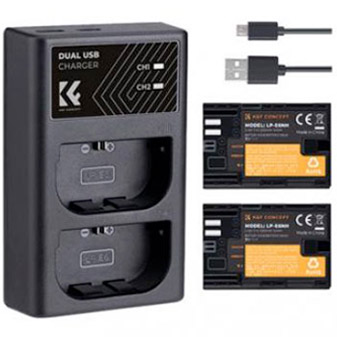
4. Use a Battery Tester
A battery tester is a device designed to measure voltage and performance directly. These tools provide an unbiased evaluation of the battery’s operational condition.
Steps to use a battery tester:
- Remove the battery from your camera.
- Plug the battery into the tester following proper orientation.
- Evaluate the voltage reading and compare it to manufacturer specifications (typically printed on the battery). If readings fall significantly below recommended levels, the battery may need replacement.
Battery testers are particularly helpful if you suspect a drop in battery efficacy but your camera doesn’t provide advanced diagnostics.
5. Charge and Observe Charging Behavior
Charging your battery can reveal additional insights into its condition. Monitor how the battery reacts during the charging process.
Normal Performance: A healthy battery charges steadily, with reasonable progress visible over time.
Warning Signs:
- If the battery heats up quickly while charging, it may have internal damage.
- Unusually long charging times can indicate decreased capacity.
- Failure to retain charge after fully charging may confirm depletion.
To ensure safety and effectiveness, always use the official charger supplied by the manufacturer or a high-quality third-party alternative certified for your camera and battery model.
6. Test Battery Longevity in Use
One practical but time-consuming method is to observe how long the battery lasts during actual use.
- Insert the battery into the camera and ensure it’s fully charged.
- Use the camera under regular operating conditions—shooting video, taking photos, or navigating menu settings.
- If the battery drains unusually fast, it may indicate failing capacity.
Comparing your observations against the manufacturer’s advertised runtime for a freshly charged unit will help you assess its performance under normal conditions.
Maintaining Your Camera Battery's Health
To ensure your battery remains functional and efficient for as long as possible, adopt the following best practices:
1. Charge Correctly
Avoid overcharging or letting your camera battery drain completely. Most modern lithium-ion batteries perform optimally when kept between 20% and 80% charge.
2. Use Certified Accessories
Always use chargers and cables recommended by the camera manufacturer. Lower-quality options may damage the battery or provide insufficient power.
3. Store Properly
Store your camera batteries at room temperature in a dry environment. Extreme heat or cold can cause irreversible damage. If storing for extended periods, ensure the battery has a charge of about 50%.
4. Avoid Frequent Full Cycles
While occasional full charge-discharge cycles may be useful for recalibrating battery monitoring systems, frequent full discharges can strain lithium-ion batteries and reduce their lifespan.
5. Carry Spares
Always carry extra, fully charged batteries when heading to extended shoots. This practice prevents rushing to charge during critical moments and ensures backup availability.
When Should You Replace Your Battery?
Even with optimal care, camera batteries have a limited lifespan. Replace your battery when:
- It consistently fails to hold a charge.
- Performance degrades noticeably despite proper care.
- It shows physical signs of damage (e.g., swelling, corrosion).
- Compatibility issues arise with your camera or accessories.
Replace your battery with a genuine model recommended by the manufacturer to avoid performance inconsistencies or potential hazards.
Final Thoughts
Checking your camera battery is a simple but vital routine for maintaining the performance, safety, and dependability of your equipment. By proactively assessing charge levels, health, and physical condition, you can gain confidence that your camera will operate reliably when you need it most. Whether you’re a professional photographer or an enthusiast, the ability to evaluate and nurture your camera battery is a skill worth adopting. Invest in proper accessories, stay informed of your camera’s systems, and prioritize battery care to ensure long-term success in your photography endeavors.
























-200x200.png "Unsure your lens mount?")