Can Ip Camera Work On Wifi?
IP cameras are one of the most versatile pieces of technology for modern surveillance and monitoring systems. Their ability to connect to networks and provide real-time viewing and recording makes them indispensable for homes, offices, and other facilities requiring security systems. One common question many users ask is whether IP cameras can work on Wi-Fi. The short answer is yes, IP cameras can indeed work on Wi-Fi, but there is more to the story than just a simple yes. This article explores the basic functionality, requirements, advantages, and challenges of using IP cameras over Wi-Fi, and offers practical solutions for installing and optimizing their performance.
What is an IP Camera?

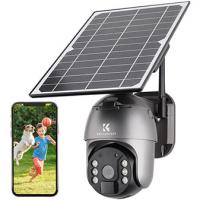
Before diving into Wi-Fi connectivity, let’s clarify what an IP camera is. An IP camera (Internet Protocol Camera) is a type of digital video camera that functions on a network via the internet or a local system. Unlike analog cameras, which require direct cabling to connect to a DVR (Digital Video Recorder), IP cameras transmit data digitally. These cameras can operate on different networks and are often accessible remotely through apps or web browsers.
How Do IP Cameras Work on Wi-Fi?

The fundamental idea behind an IP camera's Wi-Fi capability is the transmission of video data wirelessly over a local network. Instead of using Ethernet cables to connect the camera to your router or NVR (Network Video Recorder), Wi-Fi-enabled IP cameras use wireless signals to communicate. The camera needs to detect your Wi-Fi network and connect to it using login credentials like your network’s SSID and password.
Once connected, the IP camera sends real-time data, including live video footage, alerts, and recorded clips of motion events, to your network. You can access this data through your smartphone app, desktop application, or browser as long as you have network access privileges.
Requirements for Using an IP Camera Over Wi-Fi

For an IP camera to work via Wi-Fi, several prerequisites must be met:
1. Stable Wi-Fi Network: A reliable Wi-Fi connection is crucial. Wireless signals with interruptions or weak strength can hinder the transmission of video feeds.
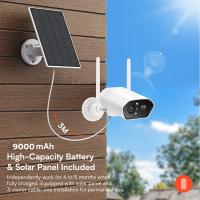
2. Power Source: Most IP cameras require a nearby power supply. However, battery-powered cameras also exist for users who prefer cordless solutions.
3. Wi-Fi Compatibility: The camera must support the Wi-Fi frequency of your router, typically 2.4 GHz or 5 GHz.
4. App or Software Access: Many IP cameras require you to install their proprietary apps or software to manage settings, configure the Wi-Fi connection, and view feed footage.
5. Router Security Settings: Your Wi-Fi network should have robust encryption (such as WPA2 or WPA3) to prevent unauthorized device access or hacking attempts.
6. Bandwidth Availability: Video streaming consumes considerable bandwidth, especially for HD or 4K footage. Ensure your network can handle the data load.
Advantages of Using IP Cameras on Wi-Fi
Employing IP cameras on Wi-Fi offers several benefits:
1. Ease of Setup
Wi-Fi eliminates the need for extensive cabling. Installation becomes much simpler since you don’t have to worry about routing Ethernet cables, which can be particularly useful for renters or anyone avoiding permanent alterations to walls.
2. Flexible Placement
Wireless connectivity enables users to place cameras in locations without proximity to their router. You can install cameras wherever Wi-Fi signals are accessible, including areas with challenging spots to run cables.
3. Remote Accessibility
Once set up on Wi-Fi, IP cameras allow remote viewing. You can check your footage from anywhere, at any time, via apps or browsers connected to the internet.
4. Cost Efficiency
Because there’s no need for additional cabling infrastructure, overall costs are reduced after purchasing the camera.
5. Support for Advanced Features
Wireless-enabled IP cameras often come with enhanced functionalities, such as two-way audio, motion detection alerts, and cloud storage for recorded footage.
Challenges When Using IP Cameras on Wi-Fi
Despite the advantages, using IP cameras on Wi-Fi can pose certain challenges:
1. Signal Interference
Wi-Fi signals can experience interference from various sources like walls, electronic devices, or neighboring networks, potentially disrupting video transmission quality.
2. Bandwidth Consumption
IP cameras transmitting HD or 4K video require significant bandwidth. If your internet plan doesn’t provide high speeds, you might experience lagging or dropped signals.
3. Power Outages
Wi-Fi connectivity stops functioning during power outages unless you have a backup battery for both your router and your camera.
4. Security Risks
Wireless devices are more susceptible to unauthorized access or hacking if security protocols aren’t properly implemented. This makes firewall settings, encryption, and regular firmware updates vital.
5. Limited Range
IP cameras work great within the range of your Wi-Fi network. However, if the camera placement is far from the router, signal strength might weaken or drop entirely.
How to Optimize Your IP Camera’s Wi-Fi Performance
To overcome the challenges listed above, here are some practical tips:
Strengthen Wi-Fi Signals
- Place your Wi-Fi router in a central and elevated location.
- Use range extenders or mesh Wi-Fi systems to improve signal coverage.
Use Dedicated Network Channels
- Configure your router to avoid overcrowded channels, especially if you notice signal interference from neighboring networks.
Upgrade Internet Plan
- Opt for a high-speed internet connection with adequate upload bandwidth so your videos stream smoothly without compromises.
Enable Encryption
- Protect your Wi-Fi network with WPA2 or WPA3 encryption to ensure your data remains safe from unauthorized access.
Backup Power Source
- Power outages can be mitigated by using uninterruptible power supplies (UPS) for your router and IP cameras.
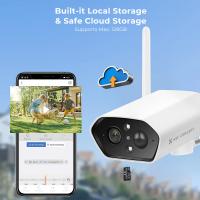
Record Locally or in the Cloud
- Save footage either on an SD card (if supported by your camera) or a cloud service to avoid losing important recordings during network outages.
Alternatives to Wi-Fi Connections for IP Cameras
If Wi-Fi isn’t ideal for your situation, other options for IP cameras are available:
1. Ethernet Connection: Wired connections provide a more stable and interference-free experience but may require additional installation efforts.
2. Cellular Connectivity: Some cameras use SIM cards to transmit footage over mobile networks, making them ideal for remote areas without Wi-Fi.
3. Powerline Networking: These systems communicate video data via electrical wiring in your home, eliminating the need for cables and Wi-Fi.
Real-World Scenarios: Should You Use Wi-Fi?
Choosing Wi-Fi-enabled IP cameras depends on your environment and requirements. Here are a few use cases:
Homes and Apartments: If Wi-Fi signals are strong in your living space, using a wireless IP camera makes the installation process convenient without dealing with messy cables.
Outdoor Surveillance: Ensure your Wi-Fi can reach areas like garages or backyards before opting for a completely wireless camera setup.
Small Offices: Wireless IP cameras can be placed strategically for monitoring workspaces without any disruption caused by cable installation.
IP cameras are versatile tools for security and monitoring, and their ability to connect via Wi-Fi offers significant benefits, from ease of installation to flexible placement. However, users must be mindful of potential challenges like signal interference, bandwidth limitations, and security risks. Understanding the fundamentals of Wi-Fi functionality and optimizing your setup can ensure seamless camera performance and reliable surveillance.
Whether you’re using IP cameras to protect your home, business, or another space, considering all requirements, advantages, and challenges of Wi-Fi connectivity will help you make informed decisions. With proper planning, an IP camera can become a highly effective component of your overall security system.